
How to Search Civil Dockets
Start with the Arizona Public Access Case Lookup. It searches public information submitted by participating courts. A name search requires the last or business name; first name, date of birth, and court narrow the results. A number search uses the prefix and numeric body in separate fields. Select the Mohave County court whenever it is known, since the same name can appear in unrelated cases and each limited court keeps its own file.
Use the docket to identify the case before requesting a document:
- Decide whether the dispute belongs to Superior Court or a Justice Court.
- Search the exact case number, or search a party name with that court selected.
- Match the caption, party roles, case category, filing date, and status.
- Read filings and court events from the complaint or petition forward.
- Check the newest hearing notice and the assigned judge's calendar.
- Request the named pleading or certified judgment from the file's custodian.
Mohave Superior or Justice Court
The civil split is a key part of a Mohave County docket search. Superior Court handles major civil disputes, domestic-relations matters, probate, and other general-jurisdiction cases. Justice Courts handle limited civil claims within statutory authority, small claims, and evictions. Municipal Courts generally do not hear private civil lawsuits, though they can issue certain protective orders.
| Court | Typical Mohave civil docket | Custodian |
|---|---|---|
| Superior Court | Major civil, family, probate, and general-jurisdiction cases | Clerk of the Superior Court in Mohave County |
| Justice Court | Limited civil, small claims, and eviction cases | The Kingman/Cerbat, Bullhead, Lake Havasu, or North Canyon clerk |
| Municipal Court | Not the ordinary forum for private civil suits | The city court for its limited records |
An eviction search should begin at the Justice Court for the precinct, not at the Superior Court copy unit. Probate takes the opposite route: it belongs to Superior Court but is excluded from statewide Public Access, so the Clerk is the direct fallback.
Small claims also remain at the Justice Court level. Mohave has four Justice Court locations, and the particular precinct controls its own docket and copies. A searcher should use the court printed on the claim or summons rather than asking the nearest clerk to locate a countywide file. This local custody split is the most important fact behind a complete civil search.
What a Civil Docket Shows
A Mohave County civil docket follows the case from filing through service, response, motion practice, settings, rulings, and any post-judgment work. The free history is an index. It can name an event even when no image is linked.
| Case number | The court's exact identifier, often using a category prefix such as CV. |
|---|---|
| Parties | Plaintiff and defendant, or petitioner and respondent, plus public counsel roles. |
| Opening filings | Complaint or petition, summons, service, and answer entries. |
| Motion practice | Motion, response, reply, hearing, and the later order when one is entered. |
| Result | Dismissal, settlement-related entries, judgment, writ, satisfaction, or appeal activity. |
When Mohave Civil Images Are Missing
A docket event with no clickable image can still be a valid filed or court-generated entry. Record the title and date, check eAccess coverage, and then request that named item from the custodian. For Superior Court, use the Mohave form and research channels. For a Justice Court small claim or eviction, contact that Justice Court directly. An unavailable icon should never be translated into “no filing.”
Read Mohave Civil Opening Entries
Complaint, service, and answer are separate steps. A complaint or petition begins the matter. Service is formal delivery of process. An answer is the responding party's formal reply. Their dates help show whether the case has reached the point where motions or a default request may follow.
- Motion
- A request for an order, not the judge's ruling.
- Order
- The judge's direction or decision.
- Default judgment
- A civil judgment after a required response or appearance was not made, subject to governing rules.
- Satisfaction
- A post-judgment entry indicating that an obligation has been satisfied as stated in the filing.
Do not read a notice as an order. Likewise, a filed motion does not show that the requested relief was granted. Continue through the Mohave County civil docket until the matching order or minute entry appears.
Default, dismissal, and judgment also describe different events. A default can follow a missed response or appearance, subject to the governing rules. A dismissal ends the claim in the way stated by the court's wording. A judgment is the formal enforceable determination. Later writ or satisfaction entries can show post-judgment activity, so a closed label alone may not answer what happened after judgment.
Types of Civil Cases on the Docket
Civil jurisdiction depends on the claim, relief, and court level. Mohave County civil dockets can include:
- Major civil disputes and general-jurisdiction claims in Superior Court.
- Domestic-relations and family matters at the Superior Court level.
- Probate matters, which do not appear in statewide Public Access.
- Limited civil claims and small claims in Justice Court.
- Evictions and forcible-detainer matters in the proper Justice Court.
Mohave Civil Images After 2010
Arizona eAccess offers available Superior Court civil documents in cases filed on or after July 1, 2010. It is separate from the free statewide index, requires an account, and can charge for documents and electronic certification. Search tools include case or party details, filing dates, judicial officer, case type, and event descriptions.
A first-page preview is unofficial. “Document Not Available Online” may mean that no public linked image is available, not that the event or record does not exist. Name the pleading and filing date from the case history, then use the Mohave Records Request Form or contact the clerk. Older files may need archive retrieval.
After login, eAccess supports Case and Party Search and Case and Event Search. Advanced controls can include filing or event date ranges, full or partial number, party or business name, case title, judicial officer, case type, and event description. Results can be sorted and exported after the required CAPTCHA. These tools help locate a known filing, but they do not change the July 2010 coverage line or public-access limits.
The Justice Court civil jurisdiction statute is a source for the limited-court split.
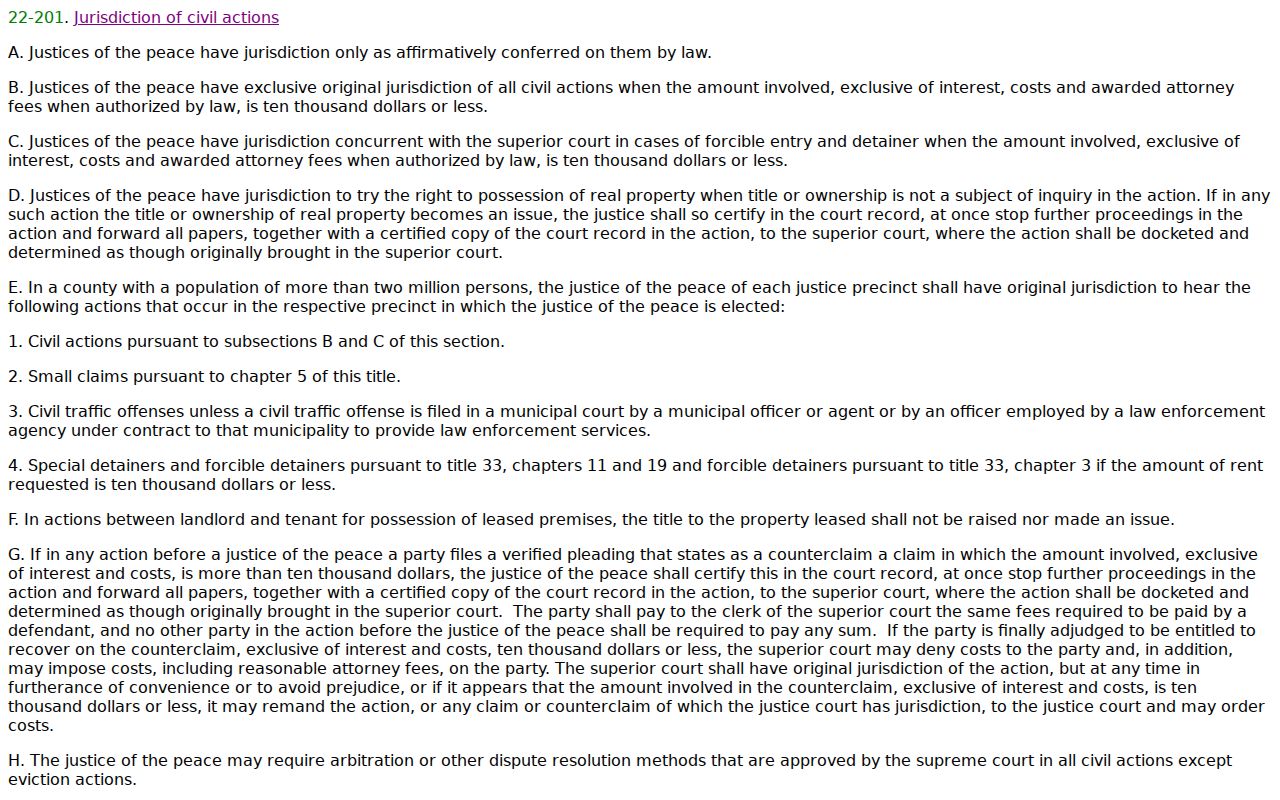
The source helps explain why a small claim or eviction may stay with a Justice Court rather than move to the Superior Court Clerk.
Settings and Hearings on Civil Dockets
A setting entry should be matched to the court, judge or division, date, time, case number, and hearing type. Mohave's calendar directory is judge-first, not one searchable county list. Superior Court division pages say calendars are posted daily at 3:00 p.m., and the linked PDFs are current snapshots rather than a historical archive.
Read the newest notice or minute entry first, identify the assigned division, and compare it with the Mohave County court calendar. A reset or continuance leaves the old setting in the history. It does not dismiss the case. When dates conflict, the court order or newest clerk entry controls over an older saved calendar, and the division clerk can confirm logistics.
Request a Named Mohave Pleading
For a Superior Court filing not available through eAccess, record the case number, caption, document title, and approximate filing date. Send the Records Request Form to clerkofcourt@mohavecourts.com, fax it to 928-718-4930 marked “Attn: Research Clerk,” call 928-753-0713 extension 4089, mail it to P.O. Box 7000 in Kingman, or visit a Clerk counter in Kingman, Bullhead, or Lake Havasu. The fax process says a research clerk calls within three business days for card payment.
State whether the copy should be plain or certified and how it should be delivered. For a Justice Court case, send the request to that Justice Court. The Superior Court Clerk cannot certify a limited-court file merely because both courts are in Mohave County.
The request form expects requester contact and delivery details, case number, party names, and a clear description of each document. Certification is a separate choice. A precise request for an “order filed on” a stated date is easier to fulfill than a broad request for everything. The clerk quotes the charge, and older or archived material may take longer than an online document.
Public Access to Civil Dockets
Arizona Supreme Court Rule 123 governs access to judicial records and permits remote access to be narrower than inspection at the court. Public Access excludes sealed cases, protective-order matters, mental-health and probate cases, and victim or witness information. eAccess also withholds documents closed by law, rule, or order. A missing result must not be treated as proof that no Mohave County civil docket exists.
Key Arizona access rules:
Rule 123 defines custodians, closed records, remote access, and review of a denial.
A.R.S. § 39-121 states Arizona's general inspection principle.
A.R.S. § 39-121.03 governs commercial-purpose reproductions and fees.
The official commercial-purpose records statute illustrates that fee and use rules can differ by request.
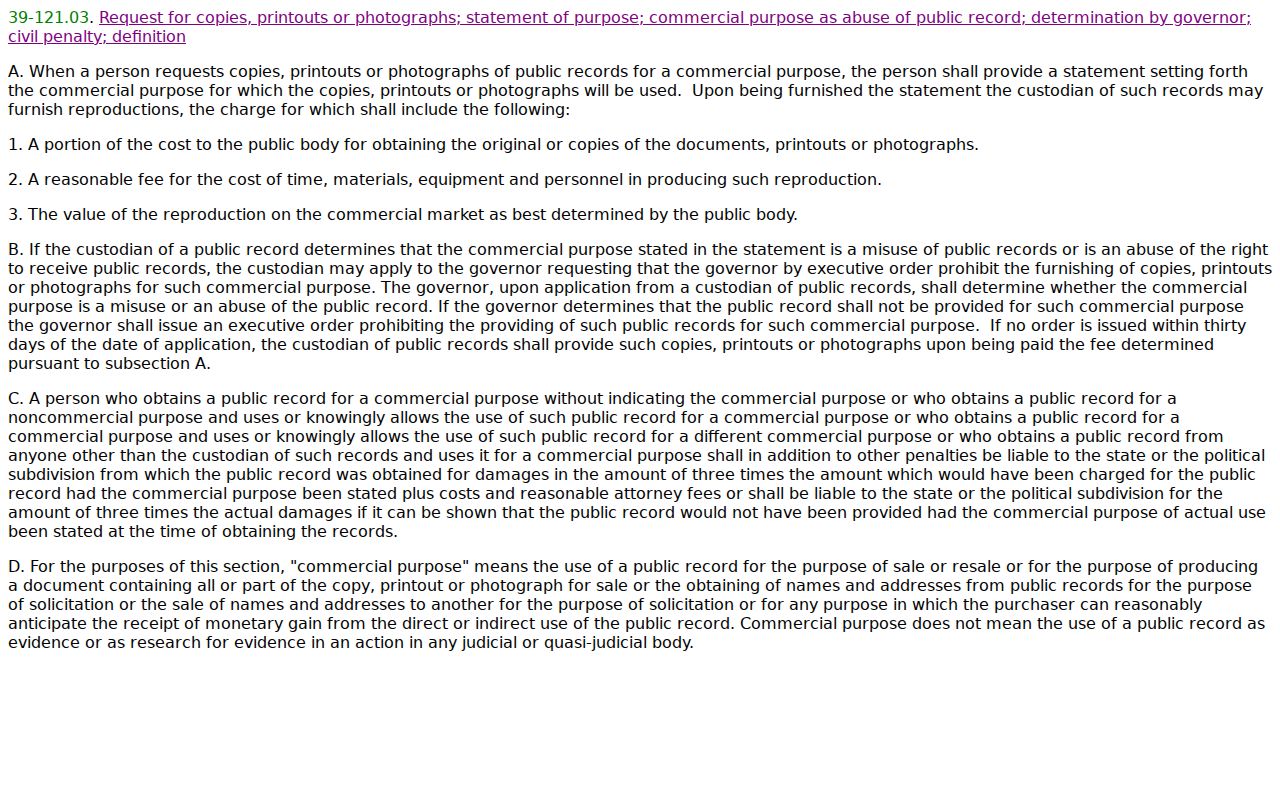
Judicial case records remain governed particularly by Rule 123, and the request must go to the court custodian rather than a general county office.
When access is limited, give the custodian the exact case number and document name. Ask whether a redacted version is available and whether a court order is required. Parties or counsel can have authenticated access that differs from the public view. The clerk cannot release protected content simply because a requester recognizes a party name. For a Rule 123 denial, the rule supplies a review route. For an ordinary missing image, the records request process is usually the practical next step.